

TL;DR
|
AI agents are no longer a concept you “try out.” They are becoming software that takes action inside real systems.
If you are responsible for delivery, operations, product, or engineering, this shift matters for one reason: an agent does not just answer questions. It can move work forward, step by step, with limited supervision.
McKinsey reports that 65% of respondents say their organizations are regularly using generative AI. Gartner predicts that by 2028, 33% of enterprise software applications will include agentic AI, enabling 15% of day-to-day work decisions to be made autonomously.
This is why the term “AI agent” is showing up everywhere. But the label is often used loosely, which makes it harder to evaluate what you are actually buying, building, or deploying.
This blog covers what an AI agent is and how it differs from a chatbot, helping you understand when a system is truly capable of executing work rather than simply responding to prompts.
AI Agent vs. Autonomous Operation
If you are assessing AI agents for a product, team, or workflow, begin with two fundamentals: what an agent is, and what “autonomous” means in operational terms.
AI Agent
You are dealing with an AI agent, which is a system that can interpret what is happening around it, determine the next step, and take actions that move it toward a goal. It operates over multiple steps rather than producing a single, isolated response.
- Perceives an environment: It receives inputs from applications and APIs, such as user requests, system events, tool outputs, files, and data.
- Decides what to do: It selects the following action based on the goal and the information available at that point.
- Takes action: It performs actions that advance the task, such as calling a tool, retrieving data, updating a record, generating a report, or initiating a workflow.
- Works across time: It continues step by step until the objective is achieved, a limit is reached, or escalation is required.
Autonomous Operation
You are evaluating autonomous operation when the agent can continue making decisions and taking actions without requiring you to specify each subsequent step, while remaining within defined rules and limits. This includes three requirements:
- You define boundaries upfront: You specify what the agent can access, what actions it is permitted to take, and what constitutes completion.
- It proceeds without continuous prompting: After receiving the goal, it can plan the sequence, execute steps, monitor progress, and adjust when conditions change.
- It remains within constraints: It operates within explicit limits such as permissions, budgets, safety controls, timeouts, and approval checkpoints.
When determining whether a system is truly an AI agent, ask: Can it perceive, decide, and act across multiple steps to achieve a goal?
When determining whether it operates autonomously, ask: Can it continue without step-by-step guidance and remain within defined limits?
What Makes An Agent “Autonomous” In Practice?
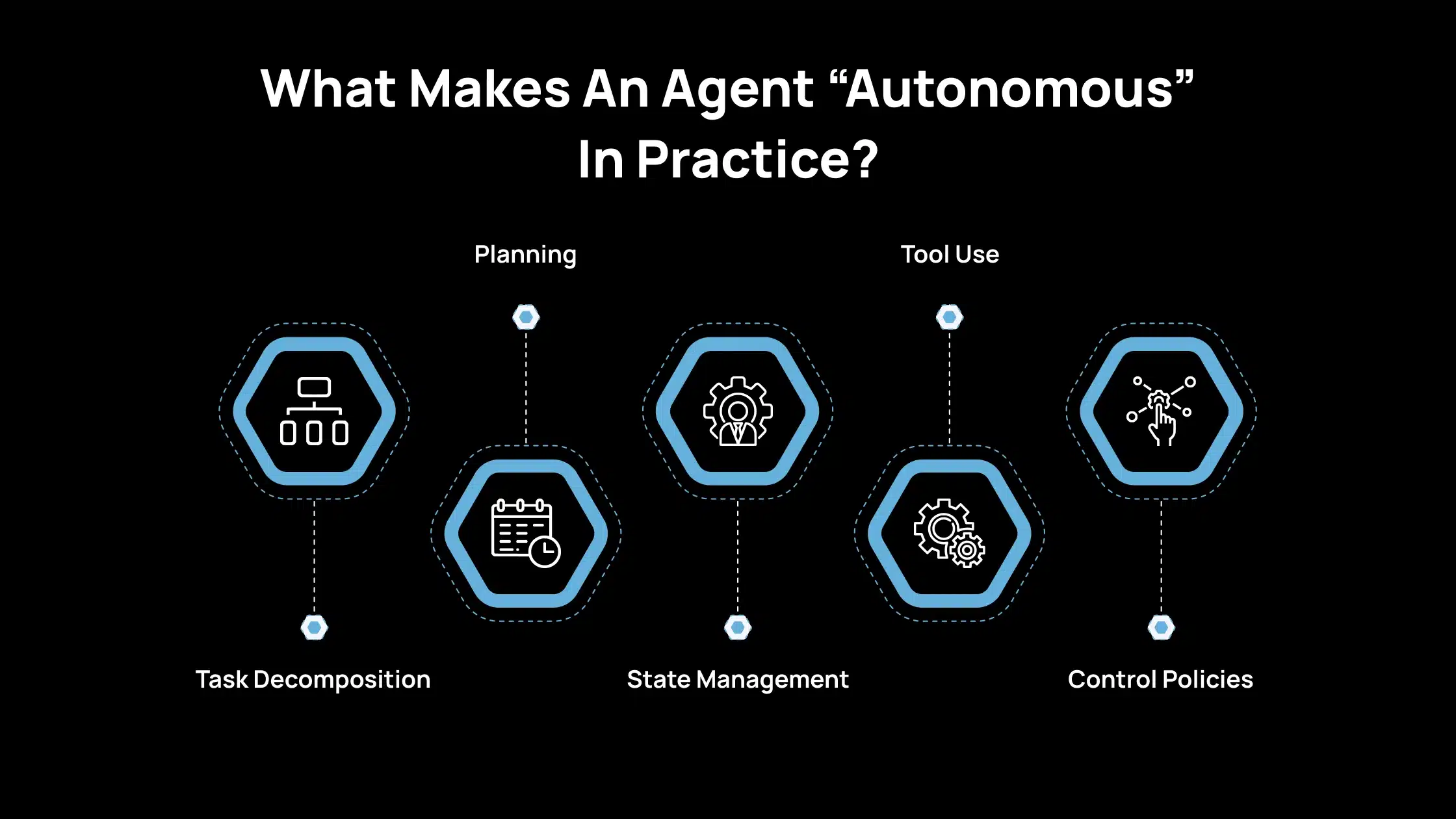
In practice, an agent is autonomous when it can carry a task forward without you specifying every step. That autonomy is not a single feature. It is a stack of capabilities that work together.
1. Task Decomposition
You give the agent a goal, and it splits that goal into smaller tasks that it can complete in order. It also tracks progress, so it knows what is finished, what is pending, and what is blocked. Without this, the agent will either stop early or repeat work.
2. Planning
The agent determines the sequence of steps and identifies their dependencies. It can revise the plan when new information arrives, such as a missing input, a changed requirement, or a tool failure. Planning keeps the work structured rather than reactive.
3. State Management
The agent keeps a reliable record of what it has done and what remains to be done. This includes outputs created so far, decisions made, tool results, and any constraints you set. State management prevents the agent from losing context across steps and reduces the need for repeated actions.
4. Tool Use
The agent uses tools to gather facts, run calculations, and interact with systems, rather than relying on the model to “remember” or guess. Tool use improves accuracy and makes results auditable, as you can trace the source of information and the operations performed.
5. Control Policies
The agent follows limits you define, such as budgets, permissions, rate limits, and rules for when it is safe to act. Control policies also include stop conditions and escalation rules, which cause the agent to pause or request approval before taking high-impact actions. This is what makes autonomy acceptable in real systems.
How AI Agents Differ From Chatbots In Real Workflows?
If you are comparing AI agents with chatbots or basic AI tools, the distinction is straightforward. An agent is intended to complete an objective. A chatbot is designed to respond to prompts.
Single-Turn Output vs. Goal-Directed Behavior
When you use a chat or completion system, you provide a prompt, it generates an output, and the interaction ends. Each response is largely independent, and there is no inherent mechanism to maintain an objective or advance a task unless you keep directing it.
When you use an AI agent, you provide an objective rather than a single question. The system keeps the objective in scope, tracks what has been completed, and determines the next action. It can operate across multiple steps, adapt when new information emerges, and stop only when the task is completed, or you intervene.
In practical terms, a chatbot produces answers. An agent progresses toward an outcome.
The Minimum Bar for “Agentic” Behavior
To classify a system as an AI agent, it must meet a basic set of requirements. Without these, it remains a prompt-response interface.
- Perception: You should expect an agent to accept inputs from its environment, not only user text. This includes user messages, files, API responses, system events, logs, and other structured signals. These inputs provide the context needed to determine what should happen next.
- Decision: An agent must be able to select the following action. Explicit rules, a planning component, or a learned policy can drive this. The critical point is that decisions are tied to the objective and the current state, not solely to the most recent prompt.
- Action: An agent must be able to perform actions, such as calling tools, writing or updating data, initiating workflows, or interacting with operational systems. These actions should produce meaningful progress, not only additional text.
- Persistence: You should be able to let the agent continue across steps and over time. It tracks what has been done, what remains, and when it should stop. This persistence is required for multi-step execution without constant oversight.
If a system cannot perceive new inputs, make decisions, execute actions, and continue across steps, it should not be treated as an agent. It is a conversational interface.
Common Types Of AI Agents And Where Each Fits
When determining which kind of “AI agent” is appropriate, it helps to classify systems into two categories: classic agent types and modern LLM-based agents. This keeps the evaluation clear and practical.
Classic Agent Types
1. Simple Reflex Agents
This type is appropriate when behavior can be defined through clear triggers. It follows condition-action rules such as “if X occurs, perform Y.” It is effective in stable environments where rules remain consistent.
2. Model-Based Reflex Agents
This type is appropriate when the current input alone is insufficient. It maintains an internal state, allowing it to incorporate prior context and respond more accurately. This helps in situations where decisions depend on what happened earlier, not only what is happening now.
3. Goal-Based Agents
This type is appropriate when achieving a defined outcome is the priority. It plans actions to reach a goal, selecting steps that move it toward completion. It is helpful for multi-step tasks with dependencies and ordering requirements.
4. Utility-Based Agents
This type is appropriate when trade-offs exist and the “best” choice matters. It optimizes a scoring function, such as minimizing cost, reducing risk, improving speed, or increasing accuracy. This is suited to scenarios that require consistent decision logic rather than acceptable approximations.
Modern LLM-Based Agents
1. Language as the Control Interface
With LLM-based agents, you often provide instructions in natural language, and the system translates them into a plan and tool actions. Depending on implementation, it may express steps as text or structured outputs. This increases flexibility but makes constraint design more critical.
2. Prompted Reasoning + Actions
These agents operate through iterative cycles in which they determine the next step and then take an action, such as searching, reading a file, or calling an API. Patterns such as ReAct support information gathering during execution rather than relying on assumptions.
Classic agent categories describe how decisions are made. LLM-based agents change how plans and actions are produced. In both cases, reliability improves when goals are explicit, limits are enforced, and outputs are validated before affecting operational systems.
The Operating Model Of An AI Agent
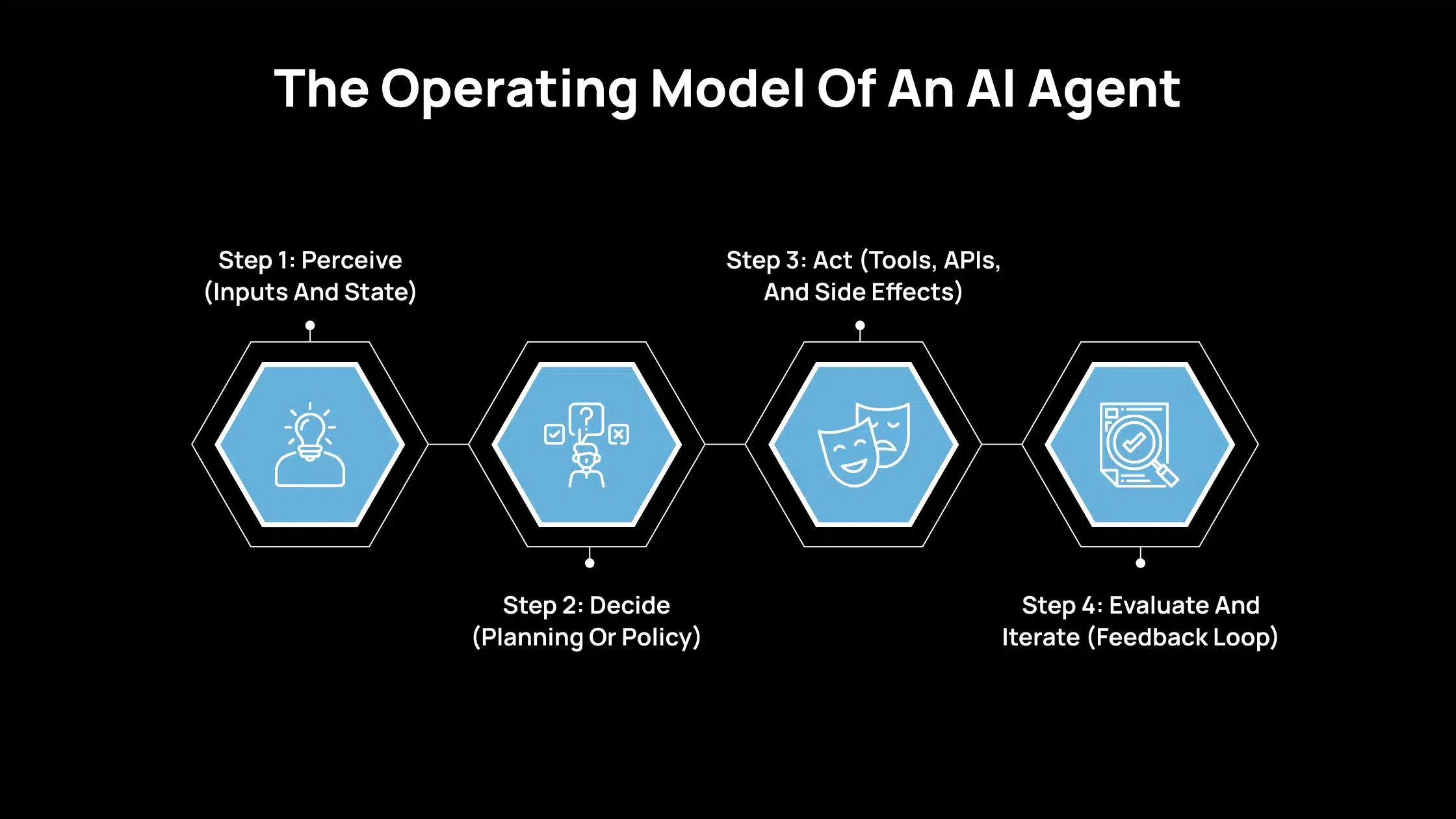
If you want to assess whether an AI agent can operate independently, examine how it executes this loop. Autonomous agents repeat these steps until the goal is achieved, a constraint is reached, or execution is halted.
Step 1: Perceive (Inputs And State)
Start by identifying what the agent can observe at a given moment. This includes new incoming information and the context carried forward from earlier steps.
External state includes your request, system events (such as errors or new tickets), tool outputs, web or search results, and database records. If an agent cannot reliably obtain current inputs, it is more likely to rely on assumptions.
Internal state includes the active plan, partial outputs, stored notes or memory, defined constraints (permissions, budgets, rules), and a record of previous actions. Internal state is essential because multi-step work fails quickly when a system cannot track what it already attempted.
Step 2: Decide (Planning Or Policy)
Next, evaluate how the agent determines its following action. This layer drives predictability, adaptability, and operational risk.
Rule-based decisions
This is the most straightforward approach. If a condition is met, the system executes a predefined action. It fits stable workflows that require consistent behavior. Its limitation is reduced performance in novel situations.
Model-based decisions
Here, the agent relies on an internal representation to estimate outcomes of potential actions. This approach is practical when conditions vary and rules are insufficient. The trade-off is greater system complexity and a stronger dependency on high-quality data.
LLM-based “planner + executor”
This approach is common in modern systems. The model proposes the next step, uses tools to gather missing information, and updates the plan based on results. It performs well on open-ended tasks, but it requires explicit constraints and verification because plausible actions are not always correct.
ReAct as a practical pattern
In many implementations, the agent alternates between short reasoning steps and tool actions. It identifies the information it needs, retrieves it using a tool, and updates its decisions based on the outcome. The primary benefit is reduced reliance on assumptions during execution.
Step 3: Act (Tools, APIs, And Side Effects)
This is where the agent transitions from generating text to performing operational work. It is essential to distinguish tool use from actions that create side effects.
Tool calls
These are actions that retrieve or process information, such as searching, performing calculations, running database queries, creating tickets, executing code, and drafting emails. Tool calls are often lower risk, especially when designed as read-only or non-destructive operations.
Side effects
These are actions that modify external systems, such as writing to a CRM, creating or merging a pull request, sending a Slack message, or scheduling a job. Side effects are the primary source of operational risk.
Once an agent can modify systems, three controls become mandatory: permissions (what it can access and change), logging (what actions it took), and stop conditions (when it must halt rather than proceed). Without these controls, autonomy becomes challenging to manage.
Step 4: Evaluate And Iterate (Feedback Loop)
After taking an action, the agent must verify progress and decide whether to continue. This is necessary to prevent unnecessary loops and reduce error propagation.
Self-checks
The agent checks alignment with the objective and constraints. Typical checks include requirement coverage, structural completeness, and consistency with stated limits.
External checks
When correctness is essential, external validation is required. This includes automated tests, schema validators, policy filters, human review, and monitoring rules that detect abnormal behavior. External checks matter because model confidence does not guarantee correctness.
Stop conditions
A reliable agent stops when appropriate. Common stop conditions include goal completion, time or budget limits, confidence thresholds, repeated tool failures, and policy triggers. Without explicit stop conditions, autonomy increases costs and raises the risk of unintended actions.
When Should You Consider Deploying An AI Agent?
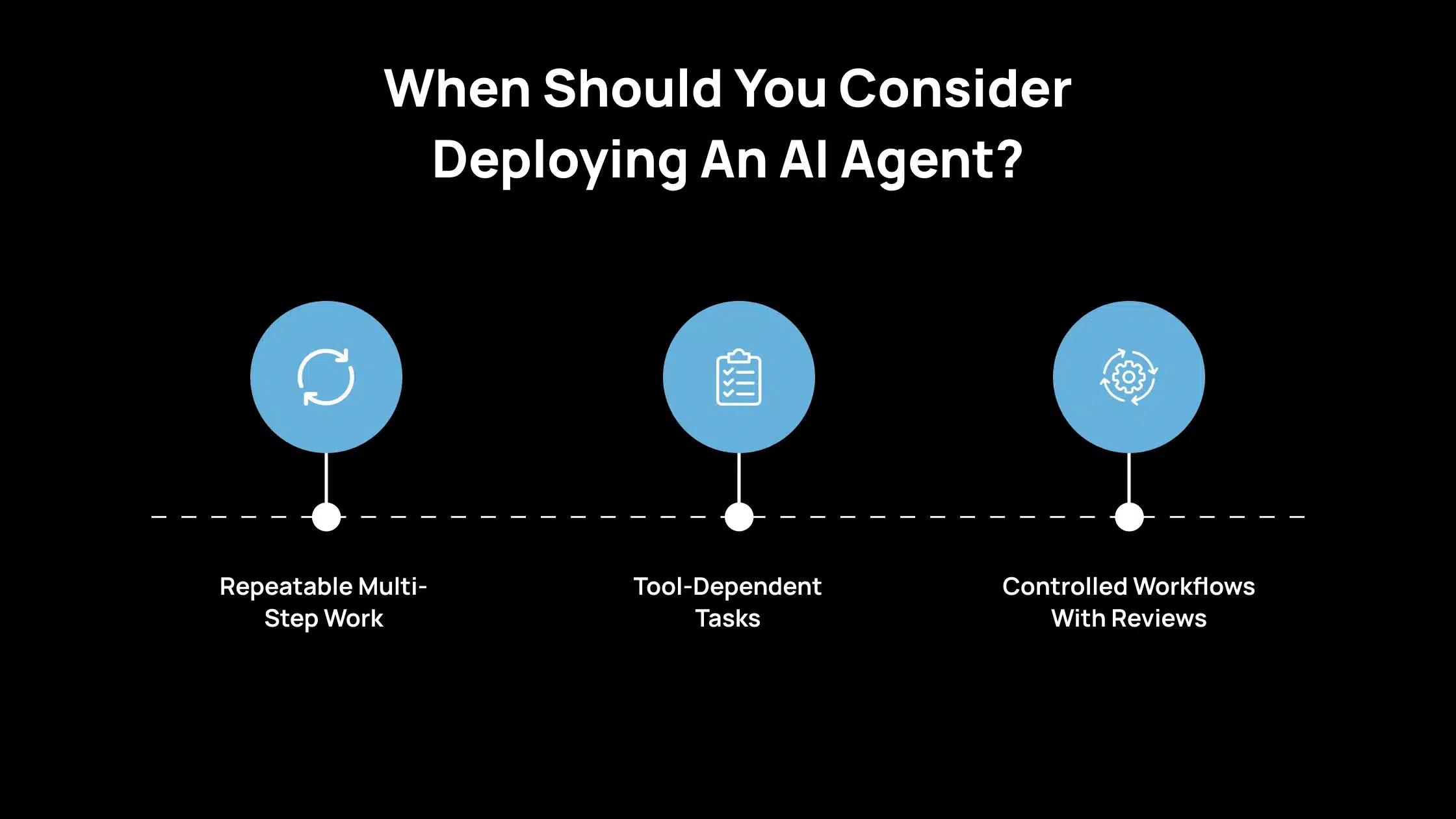
Selecting an AI agent is a good decision. You should use an agent when the work is multi-step, measurable, and can be executed within controlled limits. You should avoid an agent when the task is high-risk, unclear, or cannot be reliably validated.
1. Repeatable Multi-Step Work
Use an AI agent when the task follows a repeatable process, and the output can be checked against defined requirements.
Examples include generating weekly reports, preparing structured briefs, summarizing meeting notes into action items, updating documentation, or compiling research from approved sources. The essential condition is that you can define what “complete” looks like and verify it.
2. Tool-Dependent Tasks
Use an agent when the task depends on facts, current information, or precise computation. Tool access enables the agent to retrieve data from approved systems, run calculations, and reference source outputs, rather than relying on unsupported assumptions.
This is a strong fit for tasks such as pulling metrics from a dashboard, checking records in a database, validating totals, or assembling information from multiple internal systems.
3. Controlled Workflows With Reviews
Use an agent when you can limit its scope and introduce review steps before any high-impact action occurs.
This includes running the agent in read-only mode, restricting write access to specific fields, enforcing budgets and timeouts, and requiring approval before sending messages, updating customer records, or triggering production changes. The agent is most effective when the workflow supports rollback, auditing, and human escalation when needed.
How Avahi’s AI Solutions Deliver Real Business Value?
If you’re looking to apply AI in real-world ways that drive measurable results, you’ll find Avahi’s solutions directly address practical business needs. Avahi helps organizations adopt powerful AI capabilities securely and quickly, built on a strong cloud foundation with AWS expertise.
- Intelligent Chatbots: 24/7 customer support and engagement with natural language understanding.
- AI Voice Agents: Automated voice interactions that capture leads, schedule calls, and reduce missed opportunities.
- Summarization & Content Generation: Produce high-quality summaries, content drafts, and creative outputs quickly, saving time on repetitive writing tasks.
- Structured Data Extraction: Convert unstructured data (PDFs, documents) into usable information fast.
- Predictive Analytics & Forecasting: Gain forward-looking insights to plan better and act sooner.
- Image & Video Analysis: Identify patterns and extract meaning from visual content for operational or marketing use.
- Querying & NL2SQL Tools: Use natural language to ask questions of your data and get accurate answers without needing technical SQL skills.
- Data Masking & Compliance Tools: Protect sensitive data and maintain regulatory compliance seamlessly.
- Language Translation & Localization: Engage global audiences by translating content accurately using A
When you partner with Avahi, you’re gaining a team with deep AI and cloud experience, ready to tailor solutions to your specific challenges. Their focus is on helping you achieve measurable outcomes, such as automation that saves time, analytics that inform decision-making, and AI-driven interactions that enhance the customer experience.
Discover Avahi’s AI Platform in Action
At Avahi, we empower businesses to deploy advanced Generative AI that streamlines operations, enhances decision-making, and accelerates innovation—all with zero complexity.
As your trusted AWS Cloud Consulting Partner, we empower organizations to harness the full potential of AI while ensuring security, scalability, and compliance with industry-leading cloud solutions.
Our AI Solutions Include
- AI Adoption & Integration – Leverage Amazon Bedrock and GenAI to Enhance Automation and Decision-Making.
- Custom AI Development – Build intelligent applications tailored to your business needs.
- AI Model Optimization – Seamlessly switch between AI models with automated cost, accuracy, and performance comparisons.
- AI Automation – Automate repetitive tasks and free up time for strategic growth.
- Advanced Security & AI Governance – Ensure compliance, detect fraud, and deploy secure models.
Want to unlock the power of AI with enterprise-grade security and efficiency?
Start Your AI Transformation with Avahi Today!
Frequently Asked Questions
1. What Is An AI Agent?
An AI agent is a system that can perceive inputs, decide the next step, and take actions to reach a goal across multiple steps, often using tools and connected systems.
It is designed to progress from one step to the next based on results, rather than stopping after a single response. In practice, it combines decision logic with execution, which is why it is used for workflows rather than just conversations.
2. How Is An AI Agent Different From A Chatbot?
A chatbot mainly responds to prompts with text. An AI agent works toward an objective, tracks progress, and can take actions such as calling tools, updating records, or triggering workflows.A chatbot is typically limited to information exchange, while an agent can perform tasks that affect systems and outcomes. If you need multi-step completion and controlled execution, an agent is the more relevant category.
3. Are AI Agents Safe To Use In Business Systems?
They can be, if you apply guardrails such as limited permissions, action logging, clear stop conditions, and human approval for high-impact actions, such as sending messages or editing production data.
Safety depends on how access is configured and whether actions are auditable and reversible. In most organizations, agents should start in read-only mode and expand permissions only after validation.
4. When Should You Use An AI Agent?
Use an AI agent for repeatable, multi-step work with clear success criteria, especially when tool access improves accuracy, and the workflow includes review points before critical changes.
It is a strong fit when you can clearly define completion and verify the output against the requirements. If the task requires consistent execution across steps, an agent reduces manual coordination and follow-ups.
5. Do AI Agents Need Access To Tools And APIs?
For most real-world use cases, yes. Tools and APIs help the agent retrieve reliable data, run calculations, and interact with systems, instead of relying on assumptions.
Without tools, an agent is limited to text generation and cannot complete end-to-end operational tasks. Tool access also improves traceability, as you can track which sources were used and which actions were taken.