
TL;DR
|
Software teams aren’t falling behind because you can’t hire strong engineers. You’re falling behind because modern engineering work has become too complex to manage with human attention alone.
Every week, you’re expected to ship faster, keep systems stable, resolve incidents quickly, and reduce technical debt, while your codebase, infrastructure, and tooling keep expanding. At some point, manual coordination stops scaling.
The next productivity shift won’t come from “better developers.” It will come from systems that can reason, coordinate, and execute work alongside you. That’s what agent-based AI systems are built for.
This matters now because AI is moving beyond chat and content generation into real operational work. McKinsey estimates generative AI could create $2.6 trillion to $4.4 trillion in annual value across use cases, driven largely by productivity gains in knowledge work.
When you look at how engineering time is actually spent, triaging alerts, chasing context across tools, digging through documentation, reviewing changes, and coordinating handoffs, the bottleneck is rarely raw coding speed. It’s the overhead around coding.
A chatbot can help you answer questions, but it cannot reliably run an end-to-end engineering workflow. An AI agent can. It can break your goal into steps, pull the right context from your systems and tools, run checks, and return an output you can use, such as a PR, a test report, or an incident summary. When you connect multiple specialized agents, you get something closer to an AI support team for engineering work: one agent plans, another retrieves context, another makes changes, and another reviews risk. This blog shows you how that shift works in practice and how to design it to fit your stack and team.
Defining AI Agents in Modern Engineering Systems
An AI agent acts as a teammate; you instruct with goals, not just a model you query with prompts. It understands your intent, decides what to do next, uses tools, and reports back with a result you can act on.
You give it a clear objective (“triage this incident and suggest next steps”), access to the right tools, and guardrails for how it should behave. Instead of you manually querying an LLM step by step, the agent plans and executes several steps on its own to achieve a defined outcome.
When you design an agent, you’re not just writing a prompt. You’re defining:
- What do you want it to achieve?
- What is allowed to be done to get there?
- How it should behave when things go wrong.
Core Building Blocks of an AI Agent
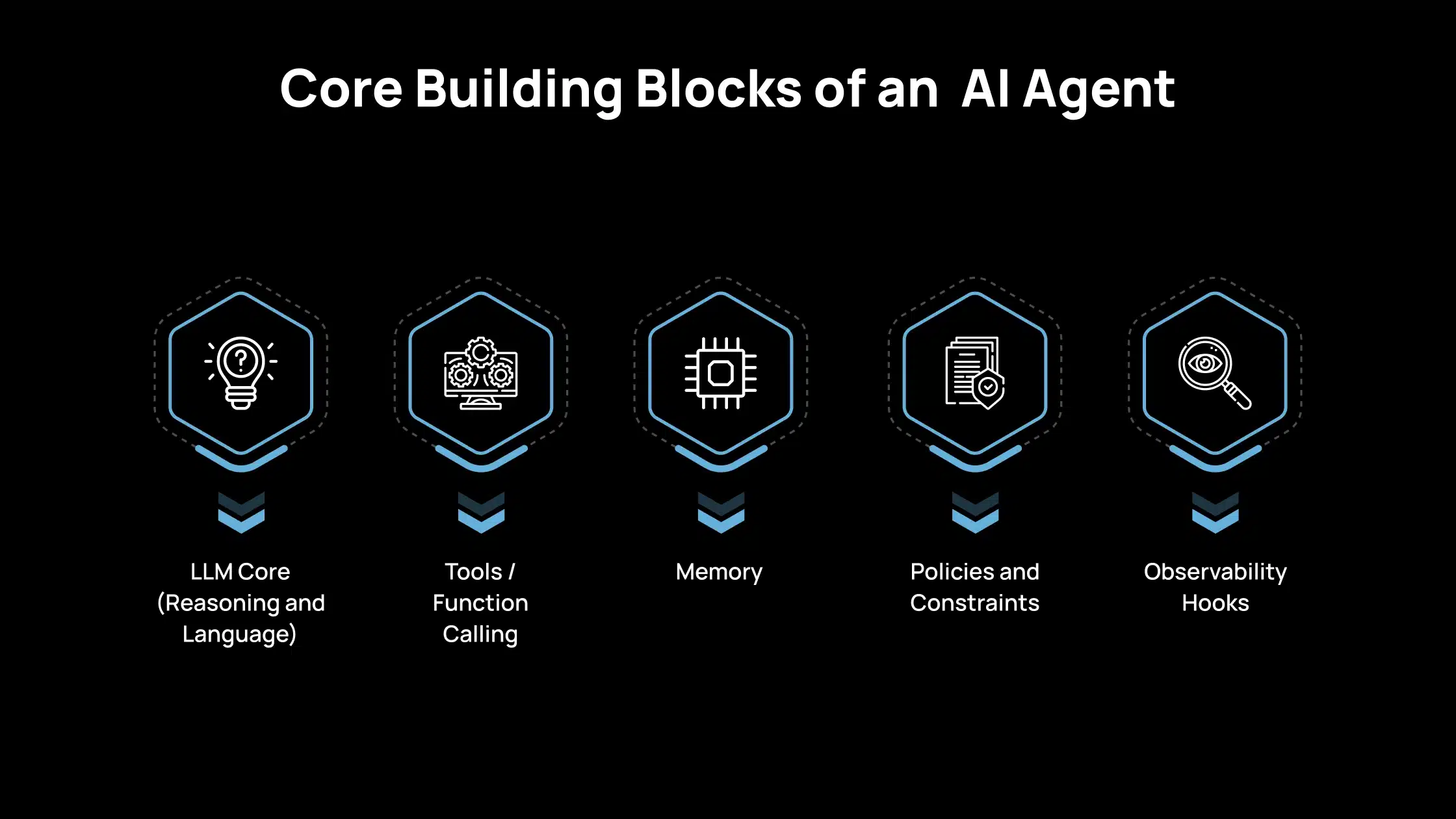
When you build an AI agent for your team, you are assembling a few clear components.
1. LLM Core (Reasoning and Language)
This is the “brain” of the agent.
- It interprets your instructions and the current context.
- It decides what to do next: ask a follow-up question, call a tool, or return an answer.
- It explains its results in a way you can understand.
You choose the LLM (e.g., OpenAI, Anthropic, etc.) based on your stack, data rules, and performance needs.
2. Tools / Function Calling
Tools turn the agent from a “chatbot” into a useful worker.
- APIs: internal services (tickets, CI, observability, billing, feature flags).
- Databases: read or write data in your systems.
- Code execution: run scripts, tests, or queries in a controlled environment.
- Search / RAG: look up docs, runbooks, designs, or past incidents.
You define these tools with strict input/output schemas so the agent can call them safely and predictably.
3. Memory
Memory lets the agent keep track of what matters over time.
- Short-term memory: Current conversation state, user preferences in this session, partial results. It is often held in the agent’s state or context window.
- Long-term memory: Information the agent should recall across sessions: project metadata, systems, runbooks, and past incidents. It is usually stored in databases or vector stores.
You decide what the agent should remember, how long it should keep it, and who can see that memory.
4. Policies and Constraints
Policies and constraints ensure the agent operates within your organization’s risk boundaries. They define what the agent is allowed to do, including which tools it can access, which environments it can operate in (for example, staging but not production), and what data it can read or act on based on user, team, or tenant permissions.
They also control how autonomous the agent can be by setting limits such as maximum execution steps, requiring human approval for high-impact actions like deployments or data updates, and specifying when the agent must stop or escalate to a human.
You treat these policies like application security rules, not just prompt text.
5. Observability Hooks
You need to see what agents are doing, just like any service.
- Logs: tool calls, inputs, outputs, and important decisions.
- Traces: the sequence of steps an agent took to complete a task.
- Metrics: success rate, time to result, error types, and human override rate.
These signals help you debug issues, evaluate quality, and prove safety and compliance.
Agent vs Workflow vs Prompted App: Fundamental Differences for Engineering Teams
| Aspect | Prompted App | Workflow / Orchestration | Agent |
| What it is | A single LLM call with a strong prompt | A fixed, pre-defined sequence of steps (DAG/flow) | A goal-driven system that decides steps at runtime |
| Input style | One request | Trigger + structured inputs per step | A goal + context + permissions |
| Output style | One response | Output produced after completing the pipeline | A final outcome after multi-step tool use and decisions |
| Planning behavior | No planning | Planning is encoded by you in advance | Plans are dynamically based on the situation |
| Tool usage | Typically none | Tools used in specific fixed steps | Tools chosen and called dynamically |
| Best for | Q&A, rewriting, simple generation | Stable, repeatable processes needing predictability | Complex tasks where the path is not known upfront |
| Engineering mindset | Prompt engineering | Pipeline design | System design (tools, policies, memory, observability) |
Why Engineering Teams Move From Single Agents to Multi-Agent Systems?
As your use cases grow, a single AI agent quickly hits limits. You ask it to plan, code, test, and reason about risk simultaneously. The result is harder to control, harder to debug, and inconsistent. Moving to multiple, specialized agents lets you design something closer to how your engineering team already works: clear roles, clear responsibilities, and clearer ownership.
1. Specialization
You get better results when each agent has a focused job. A planning agent focuses solely on breaking work down. A coding agent focuses only on code changes. A review agent focuses only on validation and risk.
By narrowing each agent’s scope, you can tune prompts, tools, and policies for that one responsibility. This makes behavior more predictable and easier to improve over time.
2. Parallelism
You often need to explore multiple paths simultaneously. One agent can research logs and metrics. Another can review recent deployments. A third can draft possible fixes or design options.
Running these in parallel shortens the time to insight. You get multiple perspectives on the same problem without having to manually coordinate each step.
3. Separation of Concerns
You also need clean boundaries for control and governance. Each agent has its own tool set and permissions. You can restrict sensitive actions (such as production changes) to a specific agent using stricter policies. You can iterate on one agent’s logic without breaking the rest of the system.
This separation makes the whole system easier to reason about, test, and secure, just as well-designed services in your architecture do.
Architectural Integration of Agent-Based Systems in Engineering Environments
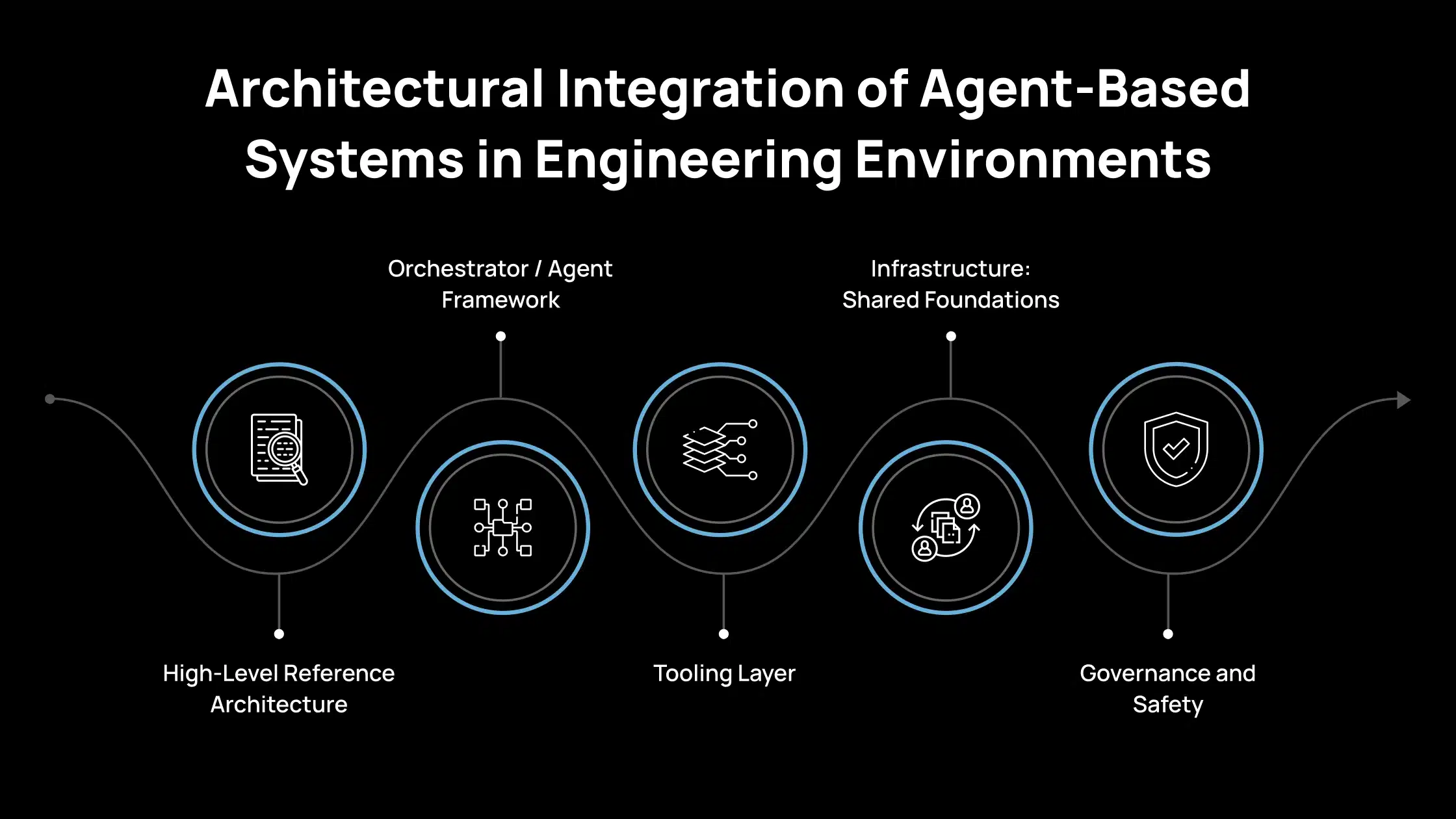
You already have services, data stores, and tooling in place. Your main question now is: where do agents live, and how do they interact with what you already run in production? This section provides you with a mental model to cleanly place agents in your architecture, rather than bolt them on as an afterthought.
1. High-Level Reference Architecture
Think of an agent-based system as a set of layers that sit on top of your existing stack. This is where requests enter your agent system.
- UI: A web app or internal console where engineers can type tasks, inspect results, and approve actions.
- CLI: Let’s developers trigger agents directly from their terminal, close to their normal workflows.
- IDE plugin: Brings the agent into VS Code, JetBrains, or your editor so it can work with code in context.
- Slack (or similar): Supports quick requests, incident triage, and sharing results with the team.
- API: Enables other services or automations to programmatically call agents.
You choose ingress points based on where your team already spends time, so adoption feels natural.
2. Orchestrator / Agent Framework
This is the “brainstem” that coordinates agents and their tools. Frameworks like OpenAI Agents SDK, LangGraph, AutoGen, Microsoft Agent Framework, CrewAI, etc., help you define agents, connect tools, and manage flows between them.
They handle routing (which agent runs next), state management, error handling, and, sometimes, flow visualization.
You use this layer instead of writing all orchestration logic from scratch. It sits as a dedicated service or module in your backend.
3. Tooling Layer
This is where agents actually get work done by calling into your systems.
- Internal APIs: Services for tickets, deployments, observability, billing, feature flags, user data, and more.
- Databases: Read/write operations on your application data, analytics stores, or configs.
- RAG (Retrieval-Augmented Generation): Search over docs, runbooks, designs, specs, and past incidents.
- Code execution sandboxes: Controlled environments where agents can run scripts, queries, or tests safely.
You expose these tools with strict schemas and permissions so agents have the minimum access they need to be useful.
4. Infrastructure: Shared Foundations
This is the common infrastructure that supports agent behavior.
- Queues: Handle background tasks, retries, and load smoothing when agents make many calls.
- Schedulers: Trigger periodic or event-based workflows (e.g., nightly checks, weekly reviews).
- Vector DB: Stores embeddings for semantic search and long-term context.
- Feature store: Gives agents structured data about users, projects, or systems if you already use one.
- Observability stack: Metrics, logs, traces for both tools and agents.
You likely already have most of this; extend it to track agent-specific activity.
5. Governance and Safety
This layer keeps your agents safe, compliant, and under control.
- Auth and access control: Tie agent actions to users, teams, and environments.
- Policy engine: Enforces rules on which tools can be used, with what parameters, and under what conditions.
- Rate limits: Protect upstream systems and external APIs from overload.
- Audit logs: Record who requested what, which agent did what, and which tools were called.
You treat agents like any other powerful service: tightly controlled, fully auditable, and easy to review.
What You Need to Build Production-Ready Agent Workflows
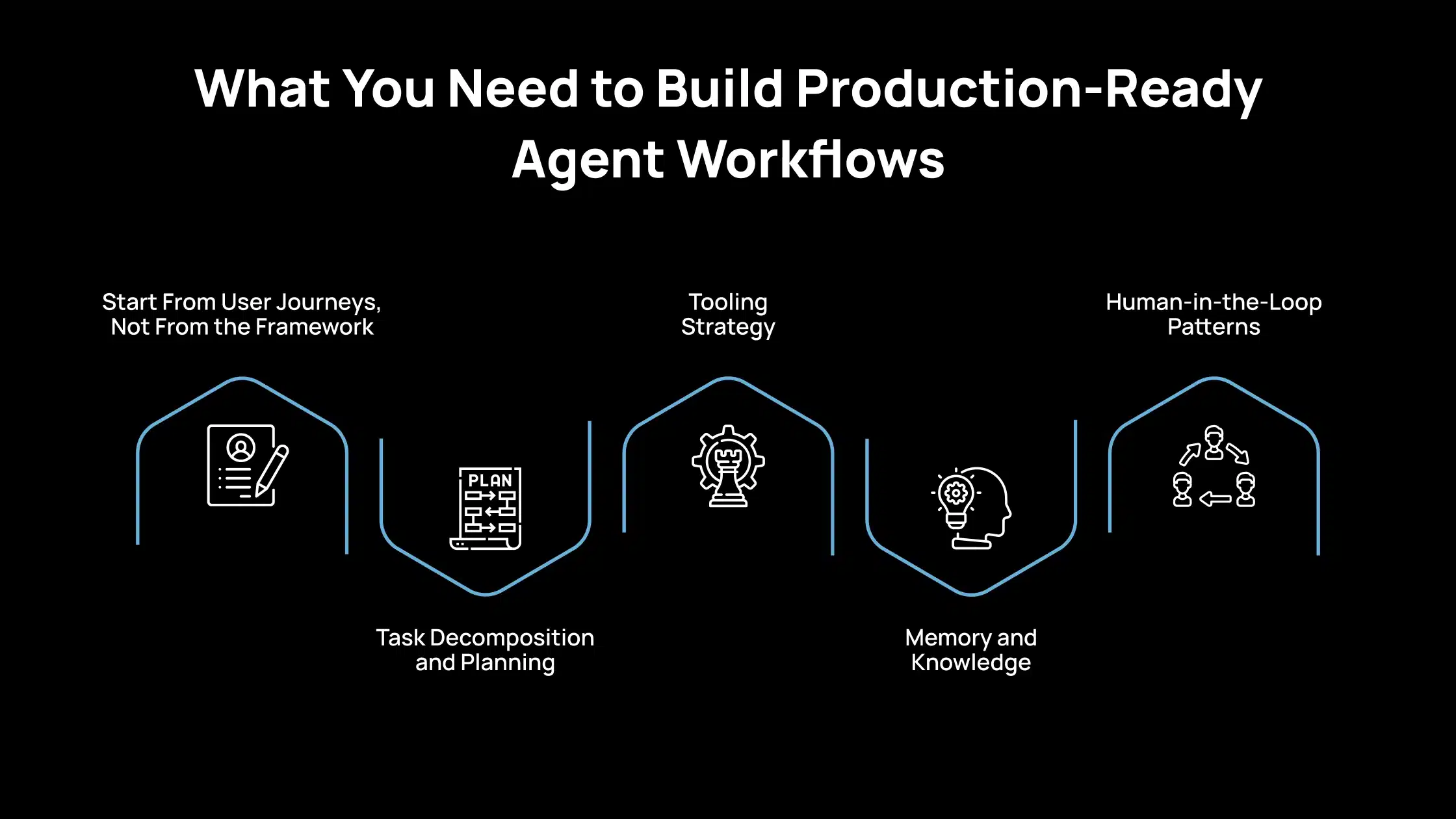
To make agents genuinely useful for engineering teams, you need to design them like production systems, not demos. That means starting from real workflows, controlling tool access, planning for failures, and keeping humans in control where risk is high.
1. Start From User Journeys, Not From the Framework
You get the best results when you design around what engineers already do daily. Start by identifying workflows that are high-value, repetitive, and time-consuming.
Once you pick a workflow, map every manual step engineers currently follow, then decide which steps the agent can handle reliably. This approach ensures the agent solves real problems instead of becoming a generic chatbot that “knows things” but doesn’t reduce workload.
2. Task Decomposition and Planning
Complex engineering tasks usually require multiple steps, and how you structure those steps determines reliability. You can use a planner agent that dynamically breaks the goal into tasks, or a static step list (a fixed workflow graph).
Planner agents work best when tasks vary a lot and require flexibility (e.g., incident triage across multiple services). Static graphs work best when you need strict control (e.g., security-sensitive workflows).
Trust the agent to plan when the cost of mistakes is low, and encode explicit guardrails when mistakes are expensive (production changes, data writes, compliance workflows).
3. Tooling Strategy
Your tooling layer is where agents become truly operational, but also where risk increases. Start with safe, high-impact tools such as read-only access to logs, metrics, documentation, ticketing systems, and repositories.
Only introduce write-capable tools (creating PRs, changing configs, deployments) once you have strong controls in place. Tool design must be strict: define function schemas with clear inputs, outputs, and constraints so the agent can’t misuse them.
Also, plan for failure. Tools will time out, APIs will return errors, and data will be missing. Your agent should handle this gracefully, using retries, fallbacks, and escalation paths, rather than failing silently or hallucinating answers.
4. Memory and Knowledge
Memory is what allows agents to stay useful across long tasks and repeated usage. Use short-term memory to track the current workflow state (what’s already been checked, what’s pending, and what’s failed).
Use long-term memory when you want the agent to reuse knowledge across sessions, such as system architecture docs, runbooks, past incidents, or team conventions. In most engineering environments, long-term memory is implemented through RAG + a vector database so the agent can retrieve relevant information on demand.
Most importantly, you must scope memory correctly: isolate context by tenant, project, or team to prevent data leakage and ensure the agent never mixes information across boundaries.
5. Human-in-the-Loop Patterns
For real engineering use cases, humans should remain in control of high-risk decisions. This keeps the workflow fast while preventing unsafe autonomous actions. You can apply this at multiple review stages, for example, approve the plan first, then approve the final action.
For privileged operations like production deployments or access to sensitive data, use a break-glass pattern: the agent can prepare the steps, but execution requires explicit human confirmation, elevated permissions, and full audit logging. This approach makes agents practical in real teams by balancing automation with accountability.
How Avahi Helps You Turn AI Into Real Business Results?
If your goal is to apply AI in practical ways that deliver measurable business impact, Avahi offers solutions designed specifically for real-world challenges. Avahi enables organizations to quickly and securely adopt advanced AI capabilities, supported by a strong cloud foundation and deep AWS expertise.
Avahi AI solutions deliver business benefits such as:
- Round-the-Clock Customer Engagement
- Automated Lead Capture and Call Management
- Faster Content Creation
- Quick Conversion of Documents Into Usable Data
- Smarter Planning Through Predictive Insights
- Deeper Understanding of Visual Content
- Effortless Data Access Through Natural Language Queries
- Built-In Data Protection and Regulatory Compliance
- Seamless Global Communication Through Advanced Translation and Localization
By partnering with Avahi, organizations gain access to a team with extensive AI and cloud experience committed to delivering tailored solutions. The focus remains on measurable outcomes, from automation that saves time and reduces costs to analytics that improve strategic decision-making to AI-driven interactions that elevate the customer experience.
Discover Avahi’s AI Platform in Action
At Avahi, we empower businesses to deploy advanced Generative AI that streamlines operations, enhances decision-making, and accelerates innovation—all with zero complexity.
As your trusted AWS Cloud Consulting Partner, we empower organizations to harness the full potential of AI while ensuring security, scalability, and compliance with industry-leading cloud solutions.
Our AI Solutions Include
- AI Adoption & Integration – Leverage Amazon Bedrock and GenAI to Enhance Automation and Decision-Making.
- Custom AI Development – Build intelligent applications tailored to your business needs.
- AI Model Optimization – Seamlessly switch between AI models with automated cost, accuracy, and performance comparisons.
- AI Automation – Automate repetitive tasks and free up time for strategic growth.
- Advanced Security & AI Governance – Ensure compliance, detect fraud, and deploy secure models.
Want to unlock the power of AI with enterprise-grade security and efficiency?
Start Your AI Transformation with Avahi Today!
Frequently Asked Questions
1. Why do engineering teams need multi-agent AI systems?
You need multi-agent systems when tasks become too complex for a single agent to handle consistently. With multiple agents, you get specialization, parallel work, and better control over permissions—making the system faster, safer, and easier to maintain.
2. What are common roles in a multi-agent architecture?
Typical roles include a planner agent (task breakdown), a retriever agent (documentation and ticket mining), a coder agent (code generation/refactoring), a reviewer agent (quality and security checks), and an ops agent (runbook execution with escalation rules).
3. How do agent-based AI systems fit into a modern engineering stack?
They usually sit as a layer between your team and your tools. Engineers interact through the UI, Slack, the CLI, or IDE plugins, while the agent framework orchestrates calls to services such as observability platforms, ticketing tools, CI/CD, documentation, and databases.
4. What tools should an AI agent have access to?
Start with safe, read-only tools like logs, dashboards, documentation search, and ticketing systems. Add write-capable tools (creating PRs, deployments, config updates) only after implementing strict policies, approval workflows, and audit logging.
5. Are agent-based AI systems safe for production use?
They can be safe if you implement strong governance: role-based access control, policy engines, tool constraints, rate limits, and complete audit trails. For high-risk actions, production-grade systems use human approval and break-glass controls.