




TL;DR
|
Recruiting is not broken because you lack candidates; it is broken because you have too many, too fast, and too little time to evaluate them well.
The average job gets about 242 applications, nearly three times as many as in 2017, which means recruiters are screening at a volume that most processes were never built for. 38% of HR leaders are already piloting or implementing generative AI, up from 19% the year before, showing that adoption is moving from experiments to real workflows.
If you are hiring today, this pressure shows up in simple ways: inboxes flooded with resumes, long scheduling loops, and good candidates dropping out while teams catch up.
AI agents for human resources are being used to fix these friction points stage by stage. Unlike basic automation, these agents can screen, coordinate, and support decision-making across the workflow while leaving final judgment to recruiters a capability that teams frequently validate first through an AWS proof of concept.
This blog breaks down where they fit, what they do best, and how to use them without sacrificing quality or compliance.
How AI Agents for Human Resources Go Beyond Chatbots and Robotic Process Automation?
AI agents for human resources are software systems that can understand a task, decide what to do next, and carry it out with little or no manual help.
They work with the same hiring tools your team already uses, but instead of waiting for a prompt, they can move a process forward on their own. They do this by reading context from data and conversations, then taking the next best step.
Examples include screening applicants, scheduling interviews, or sending follow-ups when a step is complete. Here is how they differ:
| Aspect | Chatbots | RPA (Robotic Process Automation) | AI Agents for Human Resources |
| Core function | Respond to questions. | Automate repetitive, rule-based steps. | Understand goals, decide next steps, and act across workflows. |
| Trigger | Starts only when a user asks something. | Starts when a preset rule or event fires. | Can start from a goal, signal, or workflow state without a prompt. |
| Type of work handled | Simple, fixed conversations (FAQs, status updates). | Structured tasks like copying data between systems. | Multi-step recruiting tasks that need context and sequencing. |
| Decision-making | No real decision-making; follows scripted paths. | No judgment; follows strict rules exactly. | Uses context to choose actions and adapt to situations. |
| Flexibility | Low: handles known questions only. | Low; breaks if rules don’t match the situation. | Medium to high; can handle exceptions and escalate when needed. |
| Example in recruiting | Answering “What is the interview process?” | Moving candidate data from a form to the ATS. | Screening candidates, shortlisting, scheduling interviews, and sending follow-ups end-to-end. |
| Human involvement | Needed for actions and next steps. | Needed for edge cases and rule updates. | Humans review escalations and final decisions; the agent handles the routine flow. |
Placement of AI Agents for Human Resources in Modern HR Platforms
Here is a clear view of where AI agents for human resources operate across your recruiting tools.
1. ATS (Applicant Tracking System): AI agents work inside or alongside the ATS to screen, rank, and route candidates. They can update candidate stages and keep records clean without manual entry.
2. Recruiting CRM: They help manage passive talent pipelines by tracking interactions and nudging follow-ups. They can suggest who to re-engage based on role fit and past responses.
- Scheduling tools: They coordinate calendars, send availability requests, and confirm time slots. They reduce back-and-forth and handle reschedules automatically.
- Assessment platforms: They invite candidates to tests, monitor completion, and summarize results. They can also match assessment outcomes to role requirements.
- HRIS and onboarding systems: Once a candidate accepts an offer, agents can transfer data into HRIS. They can trigger onboarding checklists, document collection, and first week tasks.
- APIs and RAG layers: APIs let agents move data between systems safely and in real time. RAG helps agents pull accurate answers from your internal hiring policies, job frameworks, and past hiring records.
How AI Agents Transform the Recruiting Workflow Across Stages?
AI agents for human resources can support recruiting from the first hiring request to onboarding. Below is how they fit into each stage and what they help you get done faster and more consistently.
1. Workforce Planning and Job Requisition
When a hiring manager shares a rough need, an AI agent can convert it into a structured requisition. It pulls out key details like role purpose, required skills, experience level, location, and reporting line. This reduces back-and-forth and gives recruiters a cleaner starting point.
The agent can compare the new role with existing open or past requisitions. If it finds duplicates or roles that are too similar, it flags them for review. It can also suggest the right job level or band based on internal job architecture and previous hires for similar roles.
2. Job Description Creation and Publishing
AI agents can create a job description that matches your standard format and tone, then adapt it for different platforms. For example, a detailed ATS version and a shorter LinkedIn version. They can also adjust wording for local compliance requirements.
The agent can scan for biased or unclear terms and suggest neutral alternatives. It can also separate must-have skills from nice-to-have skills, aligning candidates and recruiters from the start.
3. Sourcing and Talent Discovery
AI agents can look through your ATS, CRM, internal mobility databases, and external sources to find candidates with the right mix of skills. This speeds up sourcing, especially for hard-to-fill roles.
Instead of just listing names, the agent can rank candidates and explain why each fits. For example, matching skills, relevant projects, tenure in similar roles, or strong assessment history. This helps recruiters review faster and defend shortlists more clearly to hiring managers.
4. Screening and Pre-Qualification
The agent screens CVs at scale and also uses context such as role priorities, past successful hires, and hiring manager preferences. It can score candidates based on real fit rather than just keyword counts.
It applies basic knockout criteria such as legal eligibility or required certifications. For candidates who partly match, it places them in a gray zone and routes them to a recruiter instead of automatically rejecting them. This keeps human judgment in the loop for edge cases.
5. Interviews and Assessments
An AI interviewer can handle early-stage interviews through chat, voice, or video. It asks consistent questions, captures responses, and produces a structured summary for recruiters. This is most useful when volume is high, and the first round is standard.
The agent can create interview questions based on the role’s competency model and seniority level. It helps keep interviews consistent across panels and reduces the risk of irrelevant or biased questions.
6. Scheduling and Candidate Communication
AI agents can collect availability, propose slots, send confirmations, and manage reschedules. They also answer common questions about the process, role basics, and the interview format, reducing the recruiter’s workload.
They adjust communication based on the candidate’s time zone and preferred language. This is especially helpful for global hiring and reduces missed interviews caused by confusion.
7. Selection Support and Offer
After interviews, the agent can consolidate panel notes into a clear, comparable summary. It can highlight evidence tied to competencies and flag subjective comments so recruiters can steer decisions back to role fit.
Once a candidate is selected, the agent can draft offer letters using templates, salary bands, and policy rules. It routes the offer for internal approvals and logs changes, reducing manual coordination.
8. Onboarding Handoff
After acceptance, the agent pushes candidate data into your HRIS or onboarding system. It can automatically start tasks like background checks, document collection, and IT setup.
Based on role, location, and team, the agent can prepare a first-week checklist, share role-specific materials, and remind internal owners of pending tasks. This reduces the delay between the offer and the start date.
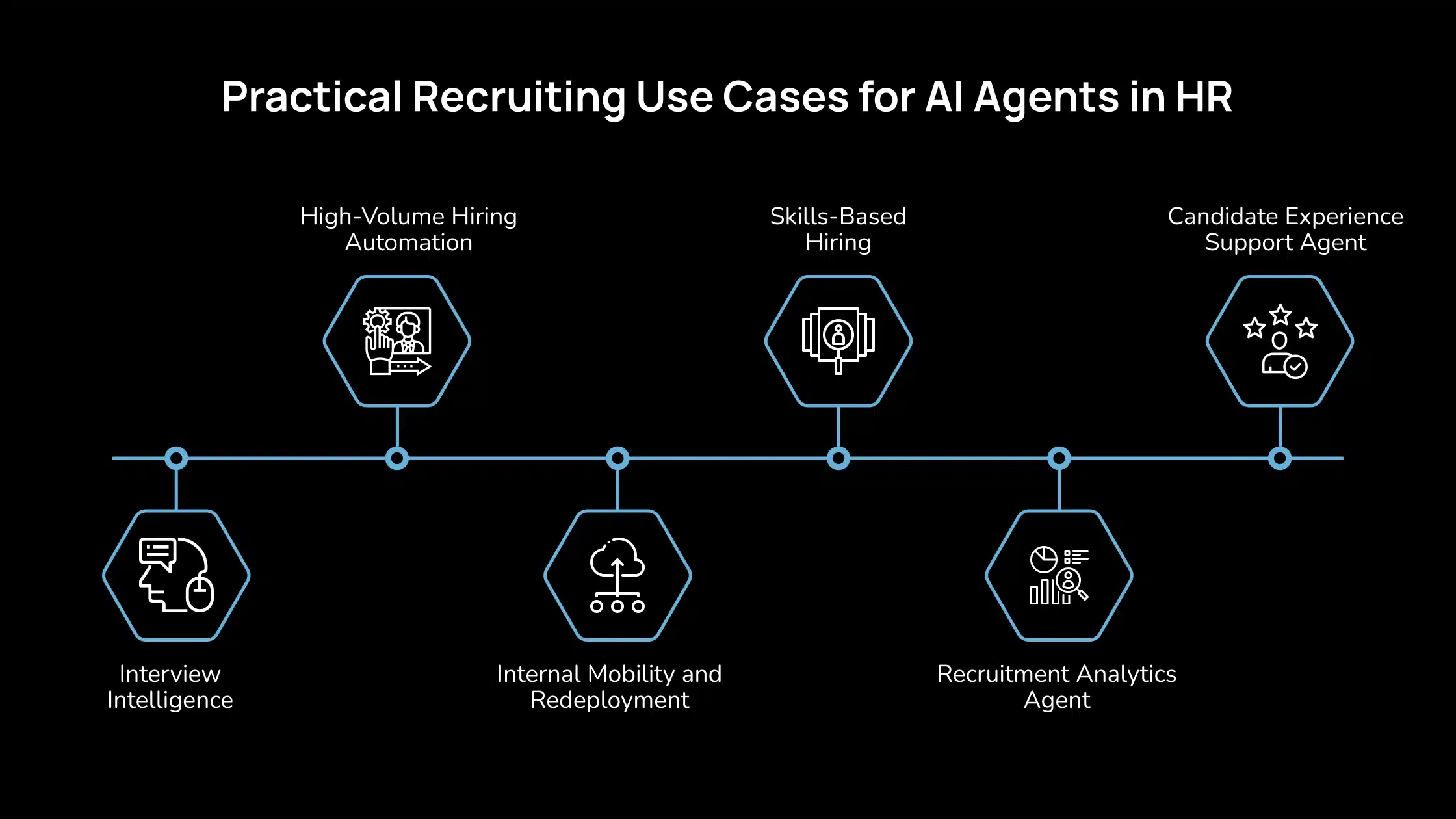
Practical Recruiting Use Cases for AI Agents in HR
If you are hiring today, AI agents for human resources can take on the parts of recruiting that slow your team down, while keeping decisions with people. Here are the main recruiting use cases and what they help you achieve in practice.
1. High-Volume Hiring Automation
AI agents are helpful when you have many applicants, and the early steps are similar for all of them. They can sort candidates into clear groups (meets basics, does not meet basics, needs review), schedule interviews in bulk, and run consistent first-round screens so every candidate gets the same baseline process. According to a recent study, HR leaders are adopting AI heavily in recruiting to handle scale and speed needs.
For instance, using an agent to screen hundreds of applications for a sales or support role, then automatically move qualified candidates to a “phone screen” stage and send scheduling links.
2. Skills-Based Hiring
Skills-based hiring agents focus on what a candidate can do, not just the degree or job title they list. They infer skills from resumes, portfolios, and work history, then map those skills to a structured skills framework. According to a recent study, AI helps recruiters identify skills and potential that traditional filters miss, especially when job titles vary across industries.
For example, the agent may recognize that someone who led “client onboarding automation” likely has workflow design and stakeholder management skills, even if those exact terms are not written. This lets you widen the pool without lowering standards.
3. Candidate Experience Support Agent
AI agents can act as a front-line support layer for candidates through chat or voice. They answer common questions in real time, explain next steps, send status updates, and help candidates complete applications. Oracle’s Candidate Experience agents, for instance, guide candidates to roles that match their profile and help them navigate the process more smoothly.
For example, after a candidate applies, the agent can confirm receipt, share the expected timeline, and address follow-up questions such as “what does the next round look like?” IT Pro reports that candidates are already seeing AI used for communication and scheduling, showing this is now a standard expectation in many markets.
4. Interview Intelligence
Interview intelligence agents support the interview stage by capturing and organizing what happens in interviews. They can transcribe interviews, fill structured scorecards, and summarize feedback against role competencies. According to a recent report, structured interviewing supported by AI can reduce bias and improve consistency in hiring decisions.
For example, after a panel interview, the agent can produce a summary: key strengths tied to the competency model, risks tied to specific answers, and areas needing follow-up. This helps hiring managers compare candidates fairly without relying on memory or informal notes.
5. Internal Mobility and Redeployment
Before posting externally, AI agents can scan internal talent for matches. They look at employees’ skills, performance history, interests, and time in role, then recommend internal candidates who could move into the open role.
A practical example is an agent alerting recruiters that two internal employees already match 80% of the skills for a new role. This shortens time-to-fill and supports retention by giving employees visible pathways forward.
6. Recruitment Analytics Agent
Recruitment analytics agents watch your funnel and flag what needs attention. They track time-to-hire by stage, detect bottlenecks (for example, too many candidates stuck in the hiring manager review), and compare source quality based on later outcomes, such as interview pass rates or offers.
For example, suppose your agent sees a high drop-off after the first interviews. In that case, it can flag that stage, pull common candidate feedback, and suggest whether the issue is scheduling delays, interview structure, or role messaging. This gives your team clear actions instead of just dashboards.
Best Practices for Implementing AI Agents in the Recruiting Workflow
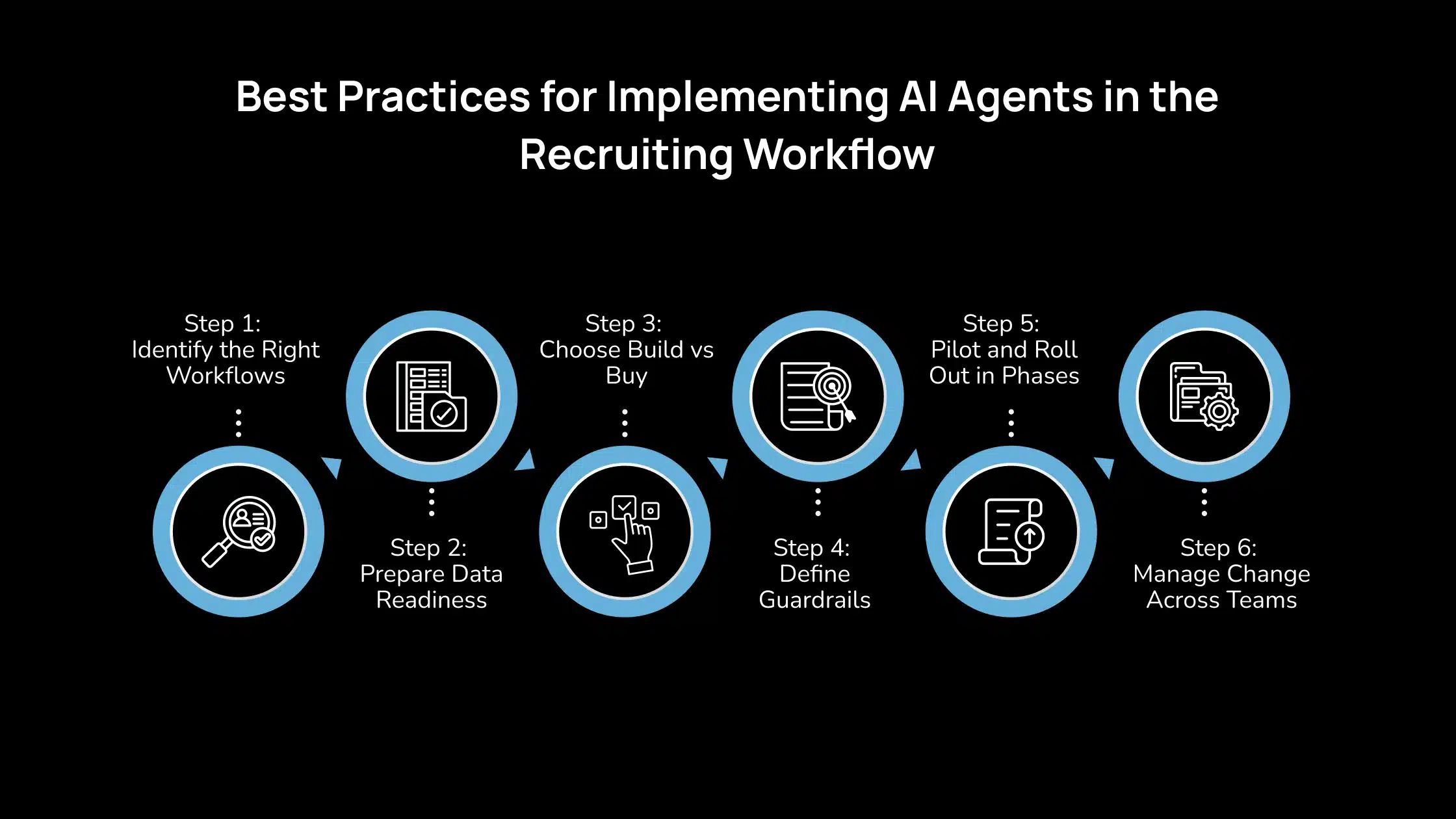
You can introduce AI agents into your human resources without redesigning your entire hiring process. The key is to start with the right workflows, prepare your data, and set clear limits on what the agent can and cannot do.
Step 1: Identify the Right Workflows
Start with high-volume, repeatable recruiting steps that follow a clear pattern. These are the areas where agents save the most time without adding risk. Typical fits include:
- The agent can review large applicant pools and rank profiles consistently using the same baseline rules.
- If your first screen is mostly about eligibility, interest, and fundamental role fit, an agent can run it consistently.
- Interview scheduling and follow-ups.
Avoid starting with workflows that depend heavily on context or sensitive judgment, like final selection decisions.
Step 2: Prepare Data Readiness
AI agents rely on clean, structured recruiting data. If the inputs are messy, the outputs will be unreliable. Focus on:
- Clean ATS records. Make sure job titles, stages, and disposition reasons are consistent across roles and teams.
- Skills tags and libraries. Standardize skills for jobs and candidates.
- Structured interview scorecards. Ensure interview feedback is captured in defined fields tied to competencies, not only free-text notes.
- FAQ and process content. Provide the agent with approved answers to common candidate questions and policy areas to ensure accuracy.
Step 3: Choose Build vs Buy
You have two routes: use agents built into your HR suite or build custom agents on top of your stack.
- Buy/use native agents. Faster to launch because they already connect to your ATS and HRIS. The vendor handles updates, security, and compliance. Best if your process matches standard recruiting workflows.
- Build custom agents. Useful when you need agents to follow a unique workflow or integrate across non-standard tools. Requires internal AI, IT, and security support.
You will also be responsible for monitoring, maintenance, and model updates.
A practical approach is to start with native agents, then add custom ones only where gaps remain.
Step 4: Define Guardrails
Agents need clear limits so they support recruiting without making uncontrolled decisions. Many HR leaders are treating governance as a core part of rollout, not a later add-on. Set rules for:
- Allowed actions such as screening, scheduling, sending updates, and drafting summaries.
- Escalation points. If a candidate is borderline on experience, the agent flags them for recruiter review rather than rejecting them.
- Audit logs. Store what the agent did, when, and why. This matters for compliance and for improving performance over time.
- Human final decision ownership. Keep hiring outcomes with recruiters and hiring managers.
Step 5: Pilot and Roll Out in Phases
Start with a small pilot tied to one role family or one region. A standard rollout sequence is:
| Phase | Focus Area | What This Includes |
| Phase 1 | Screening and scheduling | Automate resume screening, shortlist routing, interview slot coordination, reminders, and reschedules. |
| Phase 2 | First-round AI interviewer | Run structured first-round screens through chat or voice, capture answers, and generate summaries. |
| Phase 3 | Wider workflow coverage | Expand into sourcing support, internal talent matching, feedback summarization, and offer drafting. |
Define success measures before the pilot (time saved, stage conversion, candidate satisfaction), then compare results after 4–8 weeks.
Step 6: Manage Change Across Teams
Recruiters and hiring managers need to trust the agent for it to work in practice. Most failed rollouts happen because teams do not adopt the workflow, not because the AI is weak.
Plan for:
- Recruiter training. Teach what the agent does, what it cannot do, and how to handle escalations.
- Candidate communication. Disclose when AI is involved, explain why it is used, and keep an easy route to a human.
- Stakeholder alignment. Agree upfront with hiring managers on screening rules and scorecard design.
- Feedback loops. Recruiters should correct agent outcomes when needed to improve performance.
When people see that AI removes admin work but does not replace judgment, adoption is faster.
What’s Next: The Future of Agentic Recruiting
Agentic recruiting is moving toward “teams” of specialized agents rather than one all-purpose bot. In practice, you may have a sourcer agent that scans internal and external pools, an interviewer agent that runs or supports first-round screens, and an analytics agent that tracks funnel health and flags issues.
These agents coordinate through the ATS and recruiting CRM, handing candidates across stages without waiting for manual triggers. Vendors and analysts are already describing this shift from single-task automation to multi-agent, goal-driven recruiting workflows, especially for high-volume hiring.
At the same time, skills-graph hiring is becoming the backbone for both external recruiting and internal mobility. Instead of matching by titles or degrees, agents rely on a structured view of skills across jobs and people, which makes it easier to find adjacent talent and recommend internal moves before hiring outside.
Platforms focused on talent intelligence are pushing this direction, linking roles to skill clusters and career paths. Alongside that growth, regulation is tightening. Expect more standard audits and compliance checks to become routine parts of using AI in recruiting.
Why Avahi’s AI Voice Agent Works for Modern Talent Acquisition Teams?
For talent acquisition teams, speed, consistency, and secure handling of candidate data matter at every stage. Avahi’s AI Voice Agent helps HR teams keep hiring moving without adding compliance risk.
- Always-on candidate support: Candidates get instant answers and scheduling help, reducing missed calls and slow follow-ups.
- Secure data flow: Conversations and candidate details are imported into your ATS or CRM in a controlled, compliant manner.
- Less admin work: Screening, scheduling, reminders, and FAQs are automated so that recruiters can focus on decision-making.
- Audit-ready records: Every interaction is logged and traceable, making compliance reviews easier.
- Stronger candidate experience: Candidates stay informed and engaged, while your team avoids repetitive coordination.
With Avahi, teams can scale hiring faster while maintaining trust and compliance.
Discover Avahi’s AI Platform in Action
At Avahi, we empower businesses to deploy advanced Generative AI that streamlines operations, enhances decision-making, and accelerates innovation—all with zero complexity.
As your trusted AWS Cloud Consulting Partner, we empower organizations to harness the full potential of AI while ensuring security, scalability, and compliance with industry-leading cloud solutions.
Our AI Solutions Include
- AI Adoption & Integration – Leverage Amazon Bedrock and GenAI to Enhance Automation and Decision-Making.
- Custom AI Development – Build intelligent applications tailored to your business needs.
- AI Model Optimization – Seamlessly switch between AI models with automated cost, accuracy, and performance comparisons.
- AI Automation – Automate repetitive tasks and free up time for strategic growth.
- Advanced Security & AI Governance – Ensure compliance, detect fraud, and deploy secure models.
Want to unlock the power of AI with enterprise-grade security and efficiency? Start Your AI Transformation with Avahi Today!
Frequently Asked Questions
1. Can an AI interviewer replace human interviewers?
An AI interviewer can run structured first-round interviews and produce consistent summaries, but it should not replace humans in final rounds. Most teams use an AI interviewer to handle early screening and keep humans responsible for final evaluation and hiring decisions.
2. Do AI agents for human resources improve skills-based hiring?
Yes. Skills-based AI agents infer skills from resumes, portfolios, and prior roles, then match them to your skills framework. This helps recruiters find qualified candidates who may not have the exact degree or title but have the right capabilities.
3. What data is needed to implement AI agents for human resources successfully?
You need clean ATS records, clear job and skill tags, structured interview scorecards, and approved FAQ or policy content. Good data quality is essential because AI agents rely on these inputs to make accurate workflow decisions.
4. How can recruiting teams control risk when using AI agents for human resources?
Control comes from guardrails. Define what actions agents can take, where they must escalate to a recruiter, and how decisions are logged. Keep human ownership of final hiring decisions and regularly review agent outcomes.
5. Are AI agents for human resources compliant with hiring regulations?
They can be, but only if your rollout includes transparency, audit logs, bias testing, and human oversight. As AI hiring becomes more regulated, teams should treat compliance checks and monitoring as part of day-to-day operations.